Cline usage tool

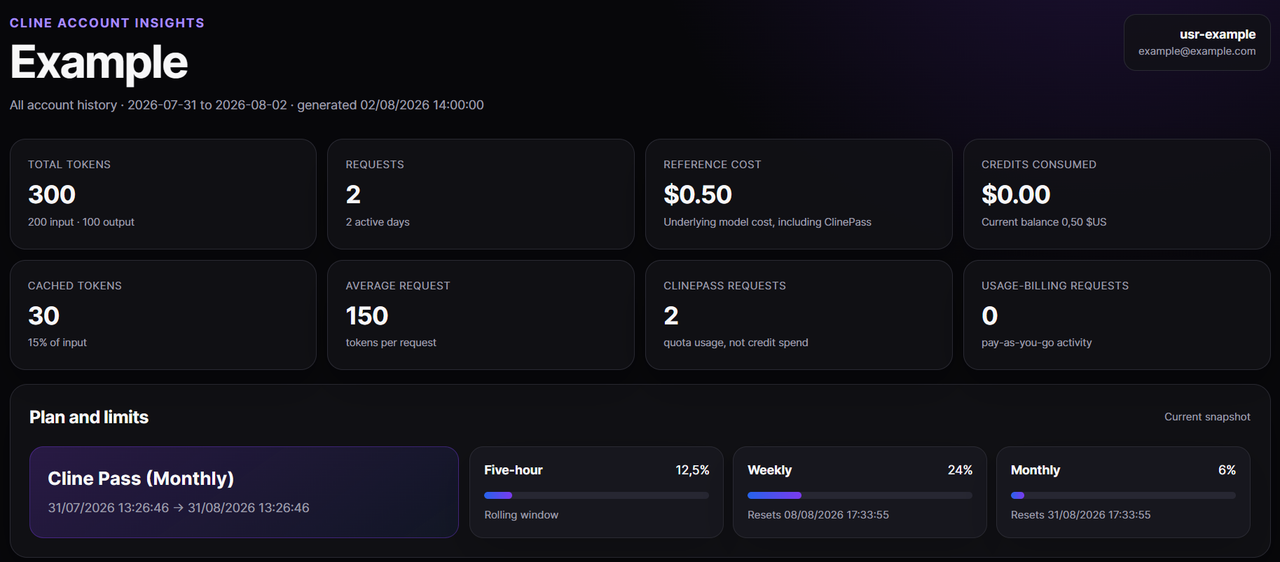
Generate a polished, self-contained report for one Cline account from the authenticated Cline API. The command collects the account’s complete history, preserves the raw API units alongside normalized dollar values, and writes HTML, JSON, CSV, SVG, and PNG artifacts.
TIP
Using Codex ? Check out https://github.com/EDM115/codex-usage-tool !
Requirements
- Bun 1.3 or newer
- A Cline API key from app.cline.bot → Account → API Keys
- Your Cline user ID, such as
usr-01EXAMPLE(if you authenticated using the Cline CLI/VS Code extension, you can find it in~/.cline/data/secrets.json, otherwise make sure you’re logged in your browser and visit https://api.cline.bot/api/v1/users/me)
Install
bun install --frozen-lockfile
Edit the .env file to set CLINE_API_KEY and CLINE_USER_ID.
Run
bun usage
Choose another output directory when needed :
bun usage --out ./reports/cline
The API key is read only from CLINE_API_KEY. It is sent in the Authorization: Bearer … request header and is never written to an artifact or printed by the CLI.
What it fetches
/api/v1/users/mefor the authenticated profile and account creation date/api/v1/users/{id}/balancefor the current credit balance/api/v1/users/me/planfor the current ClinePass subscription/api/v1/users/me/plan/usage-limitsfor five-hour, weekly, and monthly utilization/api/v1/users/{id}/usagesfor cursor-paginated detailed request history/api/v1/users/{id}/usages/dailyfor server-generated daily/model totals
The requested user ID must match /users/me.id. All history is collected from the account creation date through the current UTC date. Because the daily endpoint rejects ranges above 31 days, the CLI splits that history into consecutive inclusive windows of at most 31 days. Detailed-history pagination follows each response’s nextToken by sending it back as the next request’s cursor. Requests time out after 30 seconds and retry transient network, rate-limit, and server failures twice with bounded exponential backoff. A successful empty plan or usage-limit response is preserved as null, so accounts without an active ClinePass can still be reported.
Output files
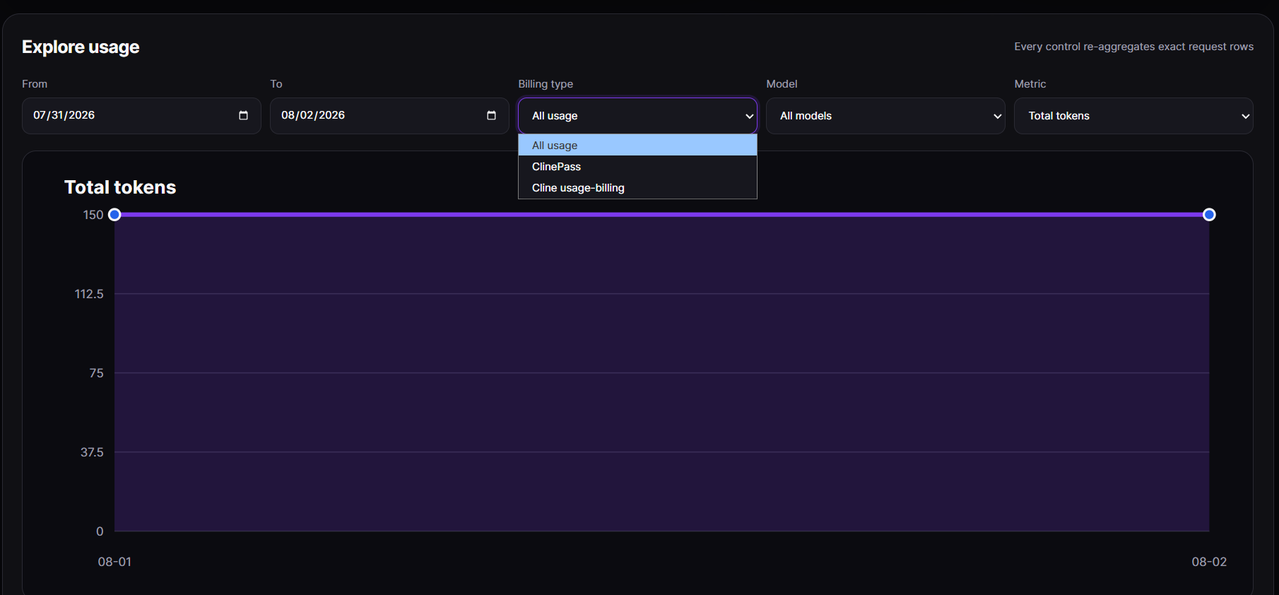
cline-usage-report.html    Interactive offline report
cline-usage.json           Complete normalized dataset and API snapshots
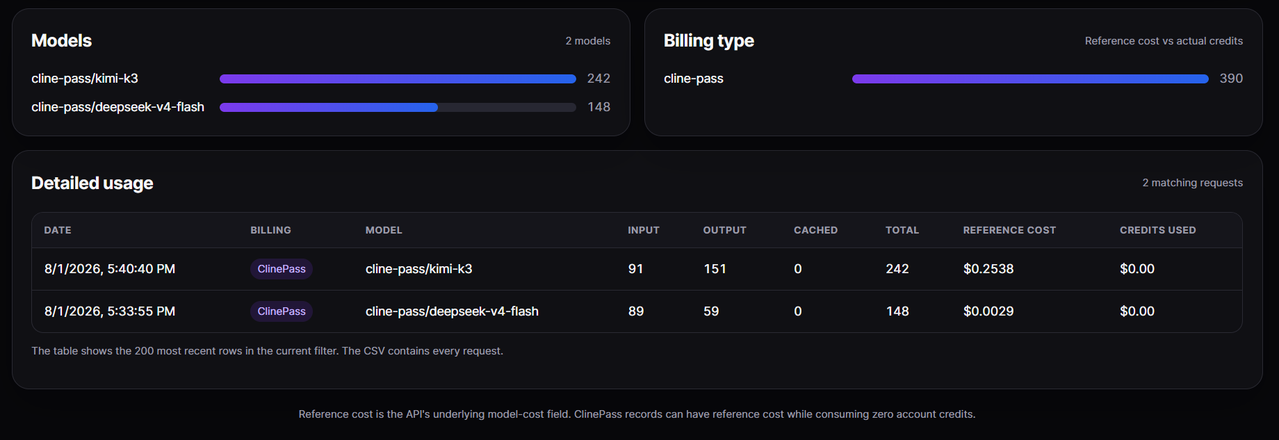
cline-usage.csv            One row per detailed usage request
chart-daily-tokens.svg     Daily token trend
chart-daily-cost.svg       Daily reference-cost trend
chart-model-tokens.svg     Token usage by model
chart-billing-type.svg     ClinePass versus usage-billing tokens
chart-*.png                PNG copy of each standalone SVG chart
The HTML embeds its data, CSS, and JavaScript and does not load third-party assets. Its date, billing-type, model, and metric controls re-aggregate the exact detailed request rows in the browser.
Understanding the money fields
ClinePass and ordinary Cline usage-billing are separate :
referenceCostUsdis normalized from the API’s integercostUsdfield. It represents underlying/reference inference cost and can be nonzero for ClinePass requests.creditsUsedUsdis normalized fromcreditsUsed. It represents actual pay-as-you-go credits consumed and is normally zero for ClinePass requests.balanceUsdis normalized from the account’s integerbalancefield.
The dashboard displays a raw balance of500000as, so the report treats these integer money fields as millionths of a US dollar. Every raw integer is retained in JSON and CSV so this inference remains auditable if the API changes.
Development
bun typecheck
bun test
Tests cover 31-day range boundaries, cursor pagination, null plan snapshots, transient retries, structured API errors, account-ID validation, legacy optional usage fields, unit normalization, aggregation, spreadsheet-safe CSV escaping, embedded-report safety, SVG/PNG rendering, and the complete CLI-to-output flow.
API status
The user profile, balance, and detailed usage endpoints are listed in Cline’s Enterprise API reference. The daily usage and plan-limit endpoints are used by the current Cline dashboard but are not fully described in the public reference, so their typed response shapes are intentionally kept narrow and raw values remain available in the generated JSON.